Xin lỗi vì làm phiền bạn
Chúng tôi muốn bạn biết rằng NAVITEL® đã cập nhật Chính Sách Bảo Mật để bảo vệ thông tin của bạn tốt hơn. Bạn vui lòng tham khảo thêm và giữ liên lạc.


Copyright © 2017, NAVITEL s.r.o. All rights reserved.
The content of this Manual, as well as any demo materials, are the sole proprietorship of the NAVITEL s.r.o. Any commercial use of this Manual may be carried out only with written permission from NAVITEL s.r.o.
1. Introduction
Introduction
This user guide describes the features and functionality of Navitel Monitoring dispatch system, and provides step-by-step instructions on how to use them to do procedures.
The key features of Navitel Monitoring are as follows:
2. Logging in
Logging in
To log in the program you should know the login data, including the user's name and password. If you do not know these data, contact your manager or system administrator in order to acquire it. If you already know the login information, proceed to the dispatch system website, and then enter your user's name and password in the text fields.
3. Interface
Interface
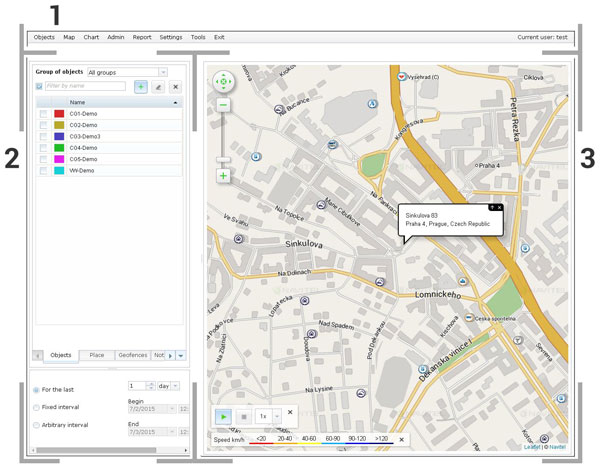
The image below displays the program interface divided into three sections: Menu bar [1], Workspace panel [2], and Map [3]. The detailed description of each section is provided below.
 >
>
3.1. Menu bar
Menu bar
This bar contains a number of drop-down menus that provide access to some features of the monitoring system. The Objects menu contains tools for managing objects. In the Map menu you can manage the visibility of the speed legend bar. In Chart you can manage display settings of the speed and fuel charts. In the Admin menu you can configure user profiles, manage roles, and regulate licensing of your companies. Clicking on the Report menu opens a special window where you can form and generate reports based on various parameters of the monitored objects. In the Settings menu you can change your password, select the language of the program's user interface, receive an API key, or define which parameters should be displayed in the Object on Map. Finally, on the Tools menu, you can work with different measuring tools, use the address search function, and regulate display of the Track player panel and the Displayed period workspace.

3.2. Workspace panel
Workspace panel
The workspace panel is intended for implementation of basic work operations such as work with objects, places, geofences, notifications, and history. These work categories are located in different sections of the workspace panel. You can switch between these sections by selecting tabs in the bottom of the workspace panel.
More detailed information about the workspace panel is presented below.
3.2.1. Head
Head
The very general settings and functions such as group selection, filter button, add, edit, and delete buttons, are located in the head of all sections of the workspace panel, except for History.
3.2.2. List
List
In the middle of the workspace panel you will always find a list of items of a specific category filtered in accordance with the filter parameters that you set. To interact with a specific item, for example to display an object on the map or change parameters of a geofence, you should select the appropriate item from the list. In certain operations you can interact with several items at a time, for that you should check several items.
3.2.3. Displayed period
Displayed period
This block in the bottom part of the workspace panel allows you to specify the time period for which you would like to see history of an object.

To show or hide display of this block, on the Tools menu, select the Displayed period checkbox.

3.3. Map
Map
The map is used for vehicle monitoring and tracking along with track and route viewing. The map also contains POI icons.
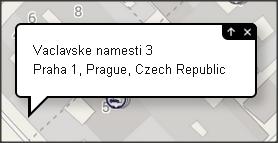
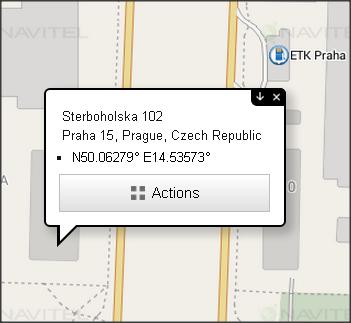
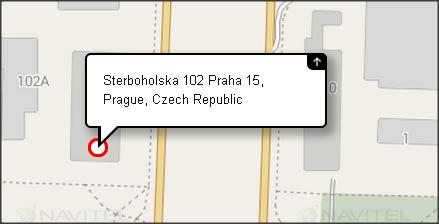
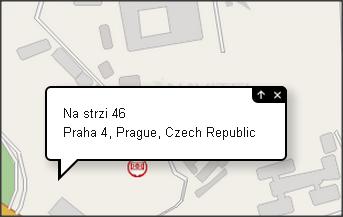
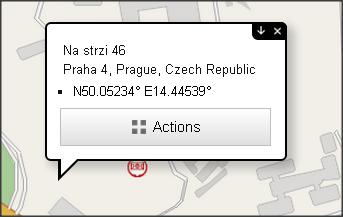
Upon clicking a point on the map, an address information board, which we call the address bubble, appears. The address bubble contains coordinates and address information of the selected point on the map. When clicking the Up arrow in the address bubble, and then the Actions button, additional options appear giving you extra possibilities to work with the selected point.
3.3.1. Map buttons
Map buttons
Map buttons are used for map navigation and zooming.
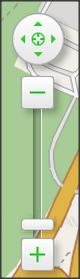
You can also navigate the map with the help of the keyboard.
3.3.2. Points of Interest (POI)
Points of Interest (POI)
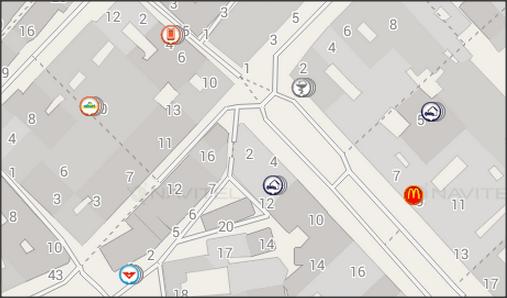
Multiple categories of POI are displayed on the map with special icons. Whether a POI category is displayed on the map often depends on the map scale – different POI are visible at different map scales.
3.3.3. Address Bubble
Address Bubble
Upon clicking a point on the map, an address information board, which we call the address bubble, appears. The address bubble contains coordinates and address information of the selected point on the map. To open the additional options, which would give you extra possibilities to work with the selected point, click the Up arrow and then the Actions button.
3.3.4. Object on Map
Object on Map
Similarly to address bubble, you can click any active monitored object on the map to open a bubble displaying information about that object.
To configure what information should be displayed in the bubble, select the Settings menu, and then open the Object on map tab. There you can configure what information should be displayed in the bubble by selecting and clearing corresponding checkboxes.

3.3.5. Legend
Legend
Tracks are displayed in different colors that indicate different speed rates. The Legend bar displays correlation between speed rates and colors.

To turn the Legend bar on, on the Map menu select Speed mode.

4. Objects
Objects
The Objects window is a section of the workspace panel. To display it, on the workspace panel select the Objects tab.

In the Objects section of the workspace panel you can see the list of objects in the current group of objects. To see all the objects from all the available for you groups, in the Group of objects drop-down listbox select All groups.

To start monitoring an object, select it from the list. To monitor several objects at once, check the marks of the objects you want to monitor.
You can use the Displayed period function to specify the time period for which you would like to display the track of the selected object.
4.1. Add new object
Add new object
If you want to add a new object to the monitoring system, complete the steps below:
 .
.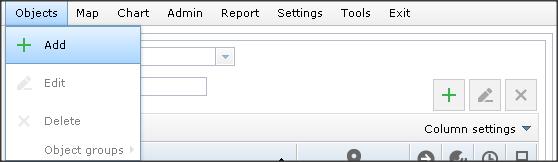
The New device dialog box opens..
Note: data necessary for setting up your particular model of tracker can be found in the Appendix chapter of this guide.
4.2. Edit object
Edit object
To edit a monitored object, follow the steps below:
 .
.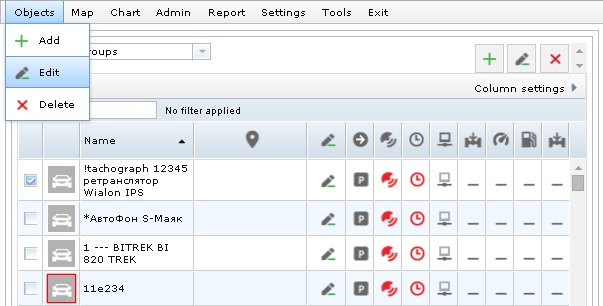
The Edit object dialog box opens..
The Edit object dialog box can also be accessed by pressing in the object's entry.
4.3. Delete object
Delete object
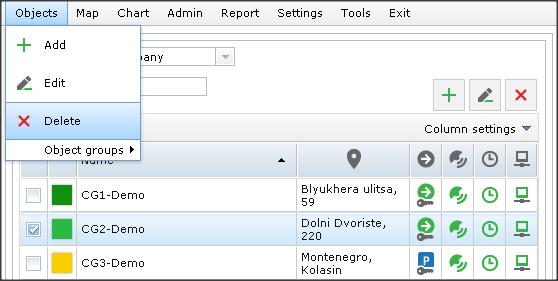
To delete an object from the system, complete the steps below:

4.4. Object groups
Object groups
When creating or editing an object, you can assign it to a specific object group. Having divided objects into groups, you can perform actions in respect to multiple objects at once. This function might be useful if you want to create a geofence that would work only for a particular category of objects, or display a certain group of objects on the map. With this function you can also create and save places that would be visible only within a specific group of objects, as well as form reports for entire object categories.
4.4.1. Create group
Create group

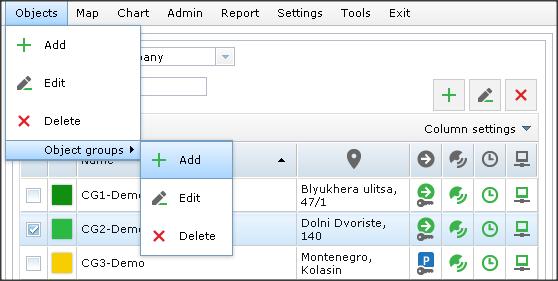
4.4.2. Edit or delete a group
Edit or delete a group
4.5. Object Statuses
Object Statuses
In the Objects section of the workspace panel, there is a list of objects of the selected group. In addition to base columns with object name and track color, the table also includes a number of optional columns:

You can specify which of the columns should be in the table. To do that, click Column settings just above the object list to open a pop-up window. In the pop-up window, select or clear appropriate checkboxes to display or hide columns.
Statuses in the columns are displayed in the form of special icons. Move the mouse cursor on an icon to display the description of the status that this icon represents.
4.5.1. User statuses
User statuses
The status bars shown in the program by default can be complemented by additional status bars. To add an additional status bar to the Object tab of the workspace panel, complete the following steps:
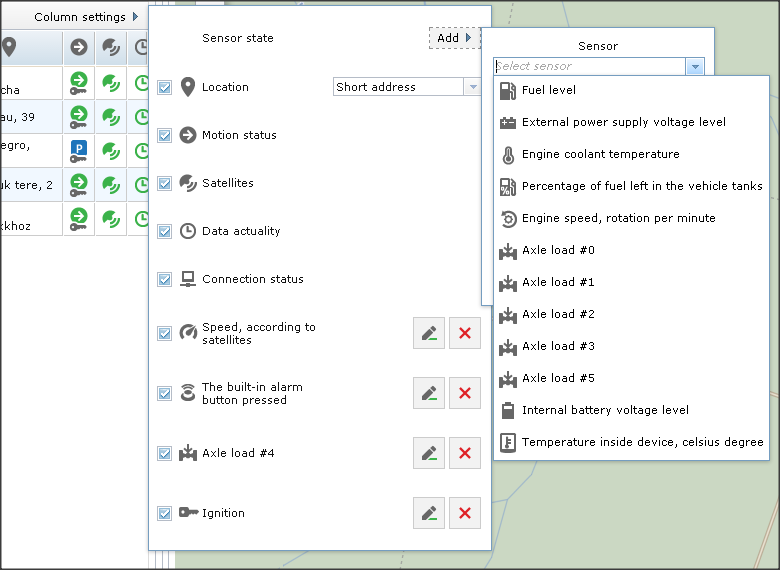
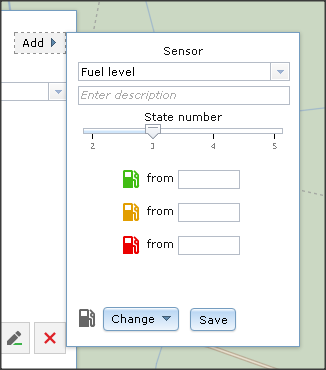
It is possible to change icons of statuses. To do that, in the gauge selection window, click Change, and then select a suitable icon.
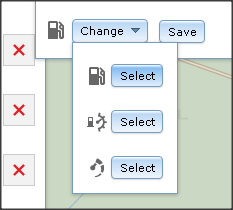
To edit a user status created before, in the Objects section of the workspace panel, click Column settings, and then click to the right of the status you want to edit. It will open a window where you can edit the status: change the number of its states and their enabling values, and change the status icon.
To delete a status created before, in the Objects section of the workspace panel, click Column settings, and then click to the right of the status that you want to delete. Confirm deletion.
To disable display of a specific status column, in the Objects section of the workspace panel, click Column settings, and then clear the checkbox of the status that you want to disable.
4.6. Trip detection
Trip detection
There are different methods of trip detection in Navitel Monitoring. You can select the suitable method of trip detection and define its core parameters. The chosen method of trip detection may affect reports and trigger some notifications, such as "Stop" or "Start".
In order to setup the method of trip detection, follow the steps:
After finishing the steps above, it is necessary to configure how the program should interpret the data it receives from gauges, so that it can make a distinction different states of the object. There are three possible states in the overall: "Ride", "Idle", and "Parking". An object can be in one state at a time.
The table below describes all available data interpretation parameters that can be set.
| Minimum satellites count | Specify the least number of satellites considered sufficient to provide valid data. |
| Minimum ride distance | Specify the minimum distance the object has to move to consider it the start of a ride. |
| Maximum parking distance | Specify the distance the object has to move to prove it is no longer parked. |
| Minimum ride duration | Specify the minimum ride duration so that any movement lasting less than that will not be considered a ride. |
| Minimum parking duration | Specify time the object should remain motionless to register it as parking. |
| Minimum speed | Specify the minimum speed at which it is considered that the object is in motion. |
4.7. Tachographs
Tachographs
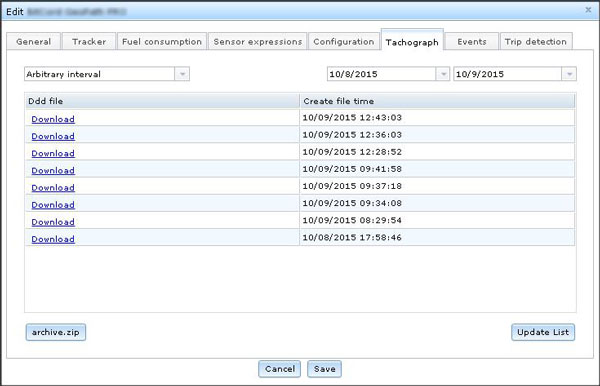
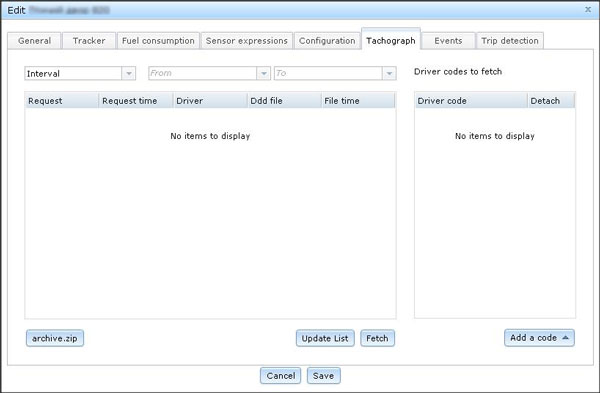
In order to retrieve information recorded on the tachograph, complete the steps:
5. Chart
Chart
The purpose of this program feature is to display graphical information about the values of the speed and fuel sensors for a specified period of time.
The Chart menu is contained on the menu bar of the program. To display a graph on the screen, on the Chart menu select the graph you want to display. There are two graphs available for display in the program at the moment.

Please pay your attention that to display graphical information about the values of a sensor, an object must be selected first.
Charts can be used as an alternative to the Displayed period box. For example, scrolling the mouse wheel while pointing the chart will allow you to zoom the time scale in and out, whereas moving the mouse pointer left or right while holding a point on the map will let you move the specified time range backward and forward. Any changes applied to the displayed period using the Chart functionality will be reflected in the Displayed period box.
5.1. Speed
Speed
Upon selecting the Speed option, the speed chart of the selected object appears in the bottom of the map.
The chart displays change of the selected object speed (km/h) over a Displayed period period of time. Moving the mouse cursor to a point in time on the chart will display the detailed speed data on that particular point of time.
When the Displayed period is selected as For the last, the chart updates on a real-time basis. When the track player is on, and if there is a point selected on the chart, the track will start to play from this point.
5.2. Fuel
Fuel
Upon selecting the Fuel option, the fuel chart of the selected object appears in the bottom of the map.
The chart displays change in the fuel level (liters) of the selected object over a Displayed period period of time. Moving the mouse cursor to a point in time on the chart will display the detailed fuel level data on that particular point of time.
When the Displayed period is selected as For the last, the chart updates on a real-time basis. When the track player is on, and if there is a point selected on the chart, the track will start to play from this point.
6. Place
Place
This functionality is intended for saving frequent address points in the program so it is easier to access and navigate them. In addition to that, the Place points are displayed on the map in the form of special icons. Places can also be assigned to Object groups.
This feature can be accessed by opening the Place section of the workspace panel.

In the Place tab you can see the list of addresses saved before. To see all the places saved, in the Group drop-down listbox select All groups.
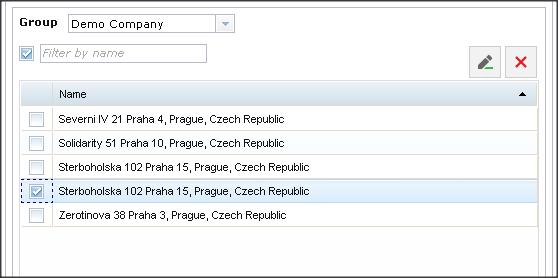
To enable display of a saved place on the map, select it from the list as shown on the picture above. You can select several placed to display at once.
To show a place on the map, click the place address in the list.
6.1. Add new place
Add new place
Saving a new place is done with the help of the Address Bubble, as shown within the steps below:



6.2. Edit place
Edit place
To edit a saved place, follow the steps below:
.6.3. Delete place
Delete place
To delete a saved place from the system, follow the steps below:
.7. Geofences
Geofences
With the Geofences feature, you can control the objects you monitor in terms of their location and movement within a specified area. Particularly, having configured the notification parameters, you can see the exact time a monitored vehicle arrives or leaves a geofence, or track the start and end time of overspeed occasions within a geofence.
The Geofences feature is a section of the workspace panel. Click the Geofences tab on the workspace panel in order to switch to this section.

In the Geofences section, the list of formerly created geofences within the selected group is represented. To see all the created geofences, in the Group drop-down listbox, select the All groups category.
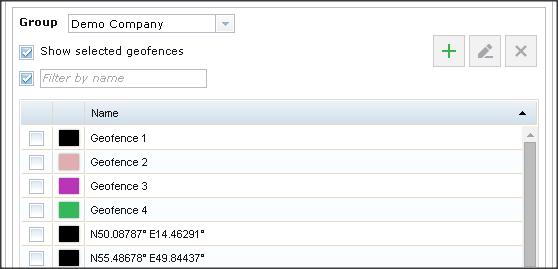
To enable display of a geofence on the map, select the check box of that geofence. You can select several geofences to display at once.
To show a geofence on the map, click the geofence name in the list, or having selected the geofence you want to find on the map, click Find the geofence on the map.
7.1. Create geofence
Create geofence
Geofences in Navitel Monitoring can be created in two different ways. To use a more automated way of creation of a geofence, follow the steps below.
If you want to learn how to create geofences of a more complicated shape, skip these steps.
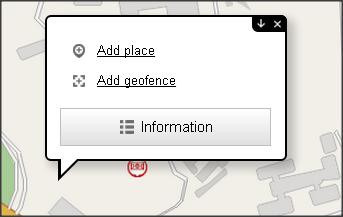
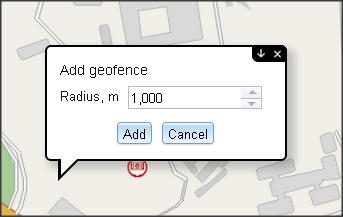
In order to create a geofence of a specific form, follow the instruction:
.
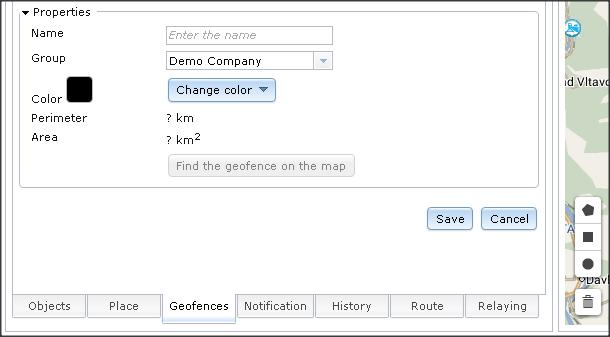
7.2. Edit geofence
Edit geofence
To edit a previously created geofence, follow these steps:
.7.3. Delete geofence
Delete geofence
To delete a geofence from the system, complete these steps:
.Notifications
This feature allows you to receive notifications about various events of the objects you monitor.
To be able to receive notifications, it is necessary to create notification templates first. In notification templates you specify the event types and monitored objects, of which you want to be notified, and compile message templates.
The Notifications feature is a part of the workspace panel. Click the Notifications tab on the workspace panel in order to switch to this section.

The Notification section of the workspace panel contains the list of configured notification templates with indication of template name, event type, notification method (message output to the screen, SMS, or email notification).
8.1. Create notification template
Create notification template
To create a new notification template:
.
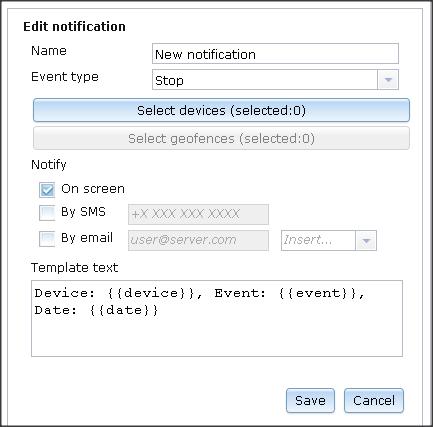
Edit notification template
To edit a notification template, complete the steps below:
.
8.3. Delete notification template
Delete notification template
To delete a notification template, complete the steps below:
.
8.4. Journal
Journal
Journal displays the list of received notifications. To display the notifications journal, in the right corner of the Notifications tab, click this button  .
.
The journal window contains all the received notifications. It is possible to filter the journal. Click this button  to open the Filter dialog box.
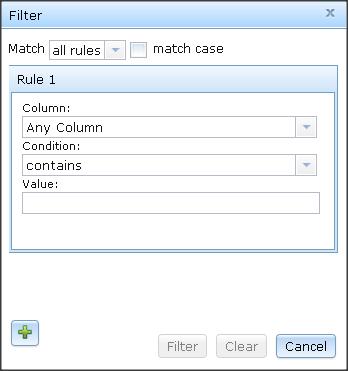
In the Filter dialog box you can create filter rules. To create a filter rule, first select a column to scan for the value that you specify later. Secondly, in the next field, indicate the condition, whether the value should equal, contain, start, end, or regard the data in the selected column in some other way. Finally, in the last text field, specify the value.
To delete all filters at once, in the Filter dialog box, click Clear. To execute the filter rules, click Filter.
9. History
History
The History feature is intended to display information about movement of objects for a specified period of time. This information is displayed as a list of events, indicated in the ascending order of their occurrence, as well as in the form of track on the map.
The History feature is a part of the workspace panel. Click the History tab on the workspace panel in order to switch to this section.

To show history of movement of the monitored objects:

The history of the selected object for the specified time period will then be listen in the History section of the workspace panel. Clicking a history event will cause the map to move to the event place and open the address bubble.
To see more detailed information about the event, select the Show track detail checkbox. The detailed information will then be presented as a table in a new window. To update data in the table, click the Update button.
Similar to that of Notification log, there are filters available in the table of the detailed history. Click the  button to open the Filter dialog box.
In the Filter dialog box you can create filter rules. To create a filter rule, first select a column to scan for the value that you specify later. Secondly, in the next field, indicate the condition, whether the value should equal, contain, start, end, or regard the data in the selected column in some other way. Finally, in the last text field, specify the value.
To delete all filters at once, in the Filter dialog box, click Clear. To execute the filter rules, click Filter.
10. Routes
Routes
In the Route section of the workspace panel, you can carry out operations related to creation of routes and regulation of traffic on them.
The entire procedure of working with routes can be split into a number of stages, with each stage dependent on the previous. First of all, it is necessary to create a route by marking all the stop and route points. The program will then build an efficient route that goes through all of the points. Secondly, a schedule is to be planned. The next step is to add objects to the schedule. The objects are then defined into trips. Finally, you optionally set up notifications that allow recording different events associated with vehicles, such as route deviation, delay, schedule overdrive etc.
10.1. Create Route
Create Route
To create a route:

.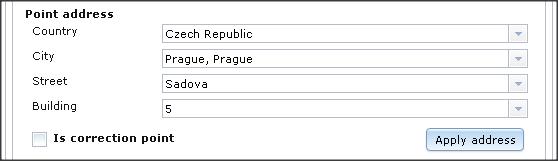
in the Waypoints block. Define the address of the next point on your route by filling out all the address point fields. Click Apply address.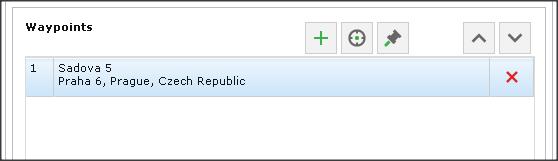
, a listbox drops down, where you can select whether the new point should be the last or first point in the route. If there is already more than 2 points in the route, the drop down listbox contains more position options: After 1, After 2, After 3, etc. Select the suitable option to determine the point after which the new point should be positioned.
 &
&  buttons to change the order of the waypoints in the route.
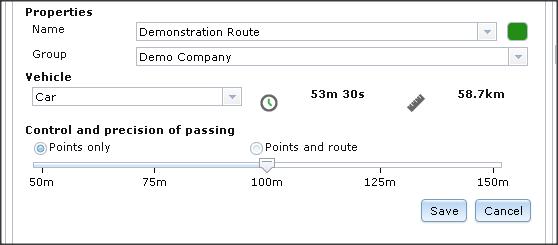
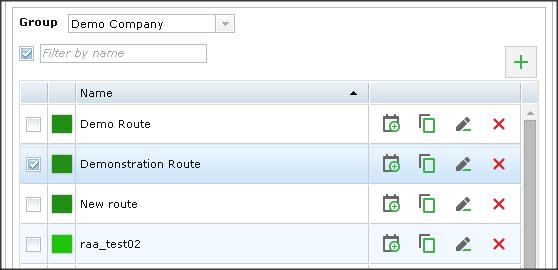
To edit a route, in the Routes tab of the workspace panel, in the box of the route that you want to edit, click . In the opened window, make the necessary changes, and then click Save.
To delete a route, click in the box of the route that you want to delete.
To copy a route, click  in the box of the route that you want to copy.
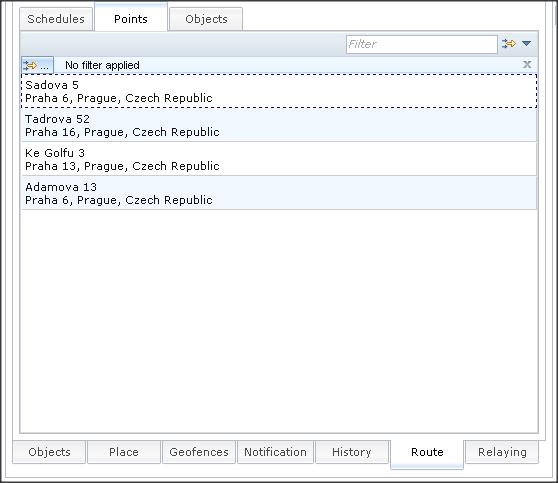
To display all the points of a route in the form of a list, in the Routes tab of the workspace panel, select the route which points you want to display. Then, in the section below, open the Points tab.
10.2. Create Schedule
Create Schedule
In Navitel Monitoring, "Schedule" is a timetable that defines the time required for passing the entire route and all its separate stop points.
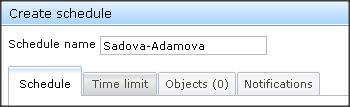
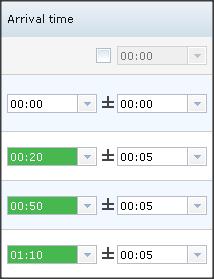
The next thing to do after creating a route is to prepare a schedule. In the workspace panel, in the Routes tab, click  in the box of the route for which it is necessary to create a schedule. The Create schedule window will open. Configure the schedule settings according to the instruction below:
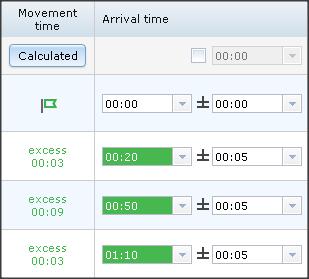
 and
and  to add or remove objects from your schedule.
To shift the entire schedule time forward or backward, in the top-right corner of the Schedule tab, click the Shift schedule for pop-up. In this pop-up window, select a suitable interval of time, and then click + or – to move the schedule by this interval forward or backward respectively.

If necessary, you can set an abort timer to abort trips that cannot be completed in time. In the bottom part of the Create schedule window, in the Abort after box, set the number of days and hours/minutes that need to pass before an incomplete trip must be automatically aborted. By default, the Abort after function is set equal to the trip duration, and hence trips are aborted at once if not completed in time.

To edit a schedule, in the Route section of the workspace panel, in the Schedules tab, click this button in the box of the schedule that you need to edit. The Edit schedule window will open containing the same functionalities as those of the Create schedule window. Make the necessary changes and then click Save.
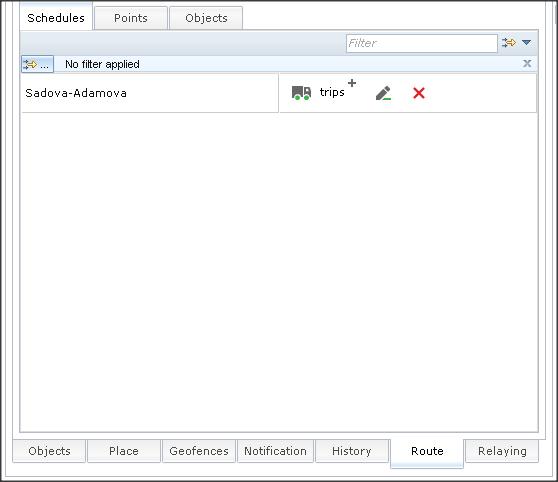
To delete a schedule, in the Route section of the workspace panel, in the Schedules tab, click this button in the box of the schedule that you want to delete.
10.3. Create Trips
Create Trips
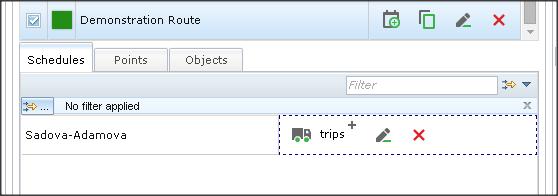
Term "Trip" in Navitel Monitoring implies a movement schedule intended for a particular object and based on a timetable of route passage. Trips can be created manually and automatically. Automatic trips are created (repeated) on a day-to-day basis. To enable automatic creation of trips in compliance with a particular schedule, in the bottom-right part of the Create schedule window, select the Auto trip creation checkbox.

To create trips manually:
 in the field of the schedule to which you would like to add a trip.
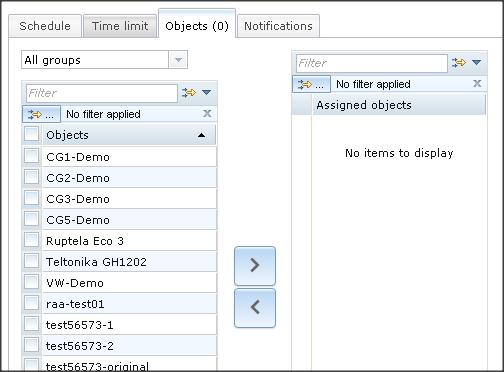
In the Create trips window, open the Objects tab and make sure that a correct object is selected for this trip.
You can display the list of all objects defined into trips and associated with the current route. To do that, select a route from the list of routes in the workspace panel, and then open the Objects tab.
10.3.1. Trip table & Trip chart
Trip table & Trip chart
If the Route section of the workspace panel is active, the Trip table is displayed in the bottom part of the map. The table contains information about all trips of the selected route. At the utter right side of the table, there is a column that contains the Edit and Delete buttons. Switch to the Trip chart tab to see information about trips in the form of a chart.
10.4. Create Similar Trip
Create Similar Trip
If there is a need to create another trip as a part of the same schedule, follow the steps:
in the field of the schedule to which you would like to add a new trip.10.5. Time Limit
Time Limit
It is possible to set up time limitations for automatic generation of trips. To set up such exceptions, in the Create schedule window select the Time limit tab.
By selecting corresponding checkboxes, indicate the days and months when this trip should be repeated.
You can also set up the Time schedule configuration to specify the time range within which the trips must be repeated. To do that, select the Time schedule checkbox, and then click Add interval. A new line will be added under the Time schedule checkbox. Specify the time range there.
Finally, you can specify the date and time until which the automatic creation of trips must keep working. To do that, in the Create schedule window, on the Time limit tab, select the Create trip until checkbox and indicate the date and time.
10.6. Create notifications
Create notifications
Notifications allow you to receive information about events related to a schedule trip.
To set up notifications, follow the steps:
11. Relaying
Relaying
With the help of this function you can exchange data about positions of monitored objects between different dispatch systems.
To set up retranslation, complete the steps:

 ..
..12. Report
Report
It is possible to generate reports on monitored objects in the program. To open the Reports window, from the menu bar select the Reports menu.

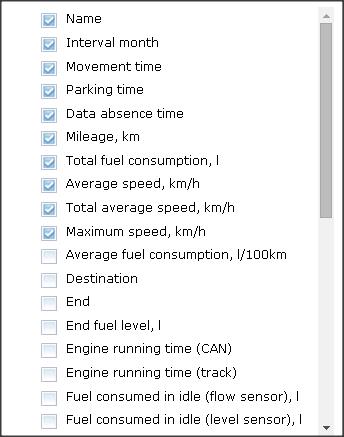
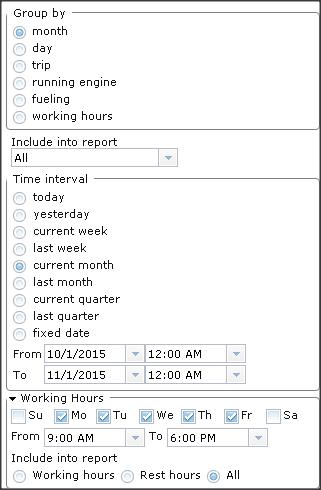
In the Reports window select the data and objects that you want to include in the report and specify the time period for which the report should be generated.
12.1. Generate report
Generate report
To generate a report, complete the steps below:
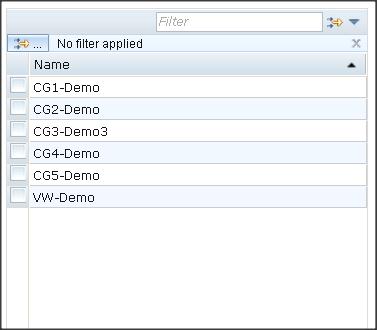
button to filter objects or click the Group drop-down listbox to select a specific group of objects.
12.2. Report Template
Report Template
The program allows you to create report templates. To create such template, in the Report window, click Save Template as, and then specify name and, if necessary, indicate a group. The current settings of the report will then be saved as a template, which can be subsequently used to generate reports.
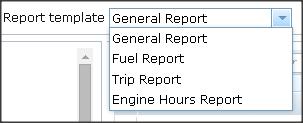
By default, there are five report templates:
By using the Save Template and Delete buttons, it is possible to make changes to the currently active template or delete it accordingly.
It is not possible to delete the default templates.
13. Admin
Admin
With the help of the Admin menu it is possible to manage companies, users, and their roles. The Admin menu, which is accessed from the menu bar, contains three menu options, including:

13.1. Companies
Companies
Use this option to manage the system licenses. With the help of this window it is possible to create companies within the framework of your access group and set up the license policy of the companies you create.
To open the Companies window, in the menu bar click the Admin menu, and then select Companies.

In the newly opened window, the list of all existing companies within the scope of your current license is displayed along with indication of the number of users and objects in each company, as well as its license creation and expiration dates.
To add a new license, in the settings box to the right, click Add, then fill in the required fields and click Save.
To edit the license settings of a company, follow these steps:
Or, if you want to delete the license:
13.2. Users
Users
This menu option is used to display the list of users with indication of their details and contact info, as well as companies, under licenses of which they work in the system. It is also possible to add new users and edit settings of existing ones in this menu.
13.2.1. Add user
Add user
To add a user to the system, follow these steps:
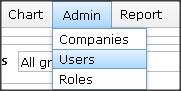
The user will be then added to the system.
13.2.2. Edit user data
Edit user data
To edit user in the system, follow these steps:
13.3. Roles
Roles
This feature allows you to assign roles to different users. In Navitel Monitoring, role is a set of rights that can be granted to a user. To open the Roles dialog box, in the menu bar click Admin, and then select the Roles menu option.
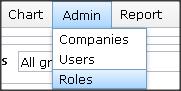
By default, there are three roles in the program, each having a different set of rights:
However, it is possible to create new roles with their own sets of rights.
To add a new role:
To edit a role:
14. Tools
Tools
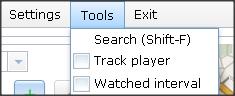
Use the Tools menu to search addresses, play tracks, and regulate display settings of the Displayed period box.
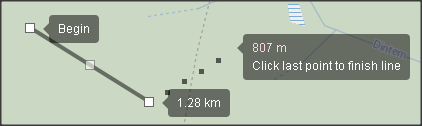
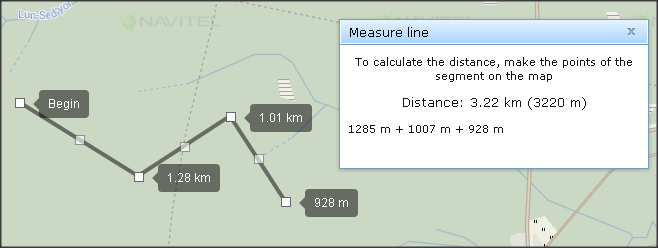
14.1. Measure line
Measure line
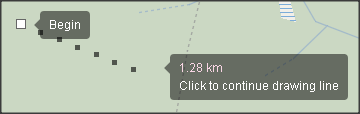
This tool is intended for measuring distance between points on the map. To work with the tool, follow the steps:
14.2. Measure area
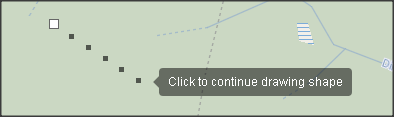
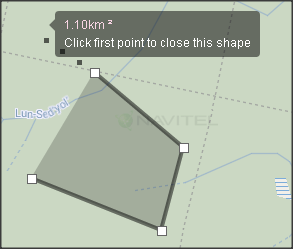
Measure area
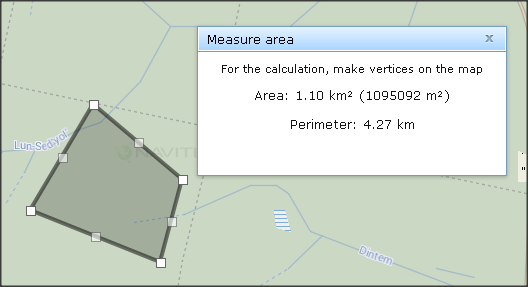
This tool is intended for measuring area defined by points on the map. Measure area works similarly to Measure line, except that to finish defining the points it is necessary to click the first created point, and not the last. To start working with the tool, follow the steps:
14.3. Search
Search
To find a specific address on the map, in the Tools menu click Search, fill in the text fields, and then click OK. It is also possible to access the Search function by using the Shift + F shortcut.

14.4. Track player
Track player
If you want to turn the track player on, in the Tools menu select Track player.

To playback track simulation, select an object from the list in the Objects section of the workspace panel, and then with the help of either a Chart or the Displayed period box, define the point of time from which you would like to play your track.
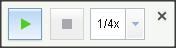
The Track player dialog box contains buttons responsible for turning the playback on and off, pausing, and changing the playback speed. During the playback, the map moves along with the monitored object.
14.5. Displayed period
Displayed period
This block in the bottom part of the workspace panel allows you to specify the time period for which you would like to see history of an object.
To show or hide display of this block, on the Tools menu, select the Displayed period checkbox.
15. Settings
Settings
In the settings menu it is possible to apply a new password, change the interface language of the program, generate an API key, and configure the types of data that should be displayed upon clicking a monitored object on the map.
To apply a new password, follow these steps:

To generate an API key:
16. Appendix
Appendix
16.1. Connecting trackers to the program
Connecting trackers to the program
Table 1 – Supported trackers and their configuration (See chapter Add new object).
| Tracker settings | Settings in the dispatch system | |||
| Port | Host | Trademark (Brand) |
Model | IMEI/ID (15-digit number, example) |
| 30154 | 87.242.72.221 | Retranslator protocol | EGTS | - |
| 30159 | 87.242.72.221 | Navitel | - | |
| 30158 | 87.242.72.221 | Nis (OlimpStroy) | - | |
| 30136 | 87.242.72.221 | Wialon IPS | - | |
| 30142 | 87.242.72.221 | Agent | Agent Silver S | 123451234512345 |
| 30142 | 87.242.72.221 | Agent Brown B | 123451234512345 | |
| 30143 | 87.242.72.221 | Agent Like | 123451234512345 | |
| 30142 | 87.242.72.221 | Agent Brown Lite | 123451234512345 | |
| 30179 | 87.242.72.221 | AGS | AGS-Lite | 123451234512345 |
| 30179 | 87.242.72.221 | AGS-PRO | 123451234512345 | |
| 30145 | 87.242.72.221 | Arnavi | GLONASS-GPS | 123451234512345 |
| 30145 | 87.242.72.221 | ARNAVI II GLONASS-GPS | 123451234512345 | |
| 30162 | 87.242.72.221 | ASC | ASC-0.1 | 123451234512345 |
| 30156 | 87.242.72.221 | ASC7-GE | 123451234512345 | |
| 30156 | 87.242.72.221 | ASC-7 | 123451234512345 | |
| 30156 | 87.242.72.221 | ASC-3 | 123451234512345 | |
| 30156 | 87.242.72.221 | ASC-1 | 123451234512345 | |
| 30156 | 87.242.72.221 | ASC-8 | 123451234512345 | |
| 30156 | 87.242.72.221 | ASC SM-1 | 123451234512345 | |
| 30156 | 87.242.72.221 | ASC-2 GLONASS-GPS | 123451234512345 | |
| 30156 | 87.242.72.221 | ASC 6 Lite GLONASS | 123451234512345 | |
| 30156 | 87.242.72.221 | ASC-6 GLONASS-GPS | 123451234512345 | |
| 30156 | 87.242.72.221 | ASC-6 GLONASS-GPS-WiFi | 123451234512345 | |
| 30156 | 87.242.72.221 | ASC 6 Lite GPS | 123451234512345 | |
| 30144 | 87.242.72.221 | ATOL | MT-700 Std Open | 123451234512345 |
| 30124 | 87.242.72.221 | Autofon | S-Mayak | 123451234512345 |
| 30124 | 87.242.72.221 | D-Mayak | 123451234512345 | |
| 30124 | 87.242.72.221 | Dialog-Mayak | 123451234512345 | |
| 30124 | 87.242.72.221 | SE-Mayak | 123451234512345 | |
| 30124 | 87.242.72.221 | SE+ Маяк | 123451234512345 | |
| 30135 | 87.242.72.221 | Azimut | Azimut GSM 5 | 123451234512345 |
| 30136 | 87.242.72.221 | BCE | FM Light | 123451234512345 |
| 30136 | 87.242.72.221 | FM Light+ | 123451234512345 | |
| 30136 | 87.242.72.221 | FM Blue+ | 123451234512345 | |
| 30131 | 87.242.72.221 | BiTrek | BI 820 TREK | 123451234512345 |
| 30137 | 87.242.72.221 | cGuard | cGuard 285 | 123451234512345 |
| 30137 | 87.242.72.221 | cGuard Personal | 123451234512345 | |
| 30137 | 87.242.72.221 | cGuard Atom | 123451234512345 | |
| 30137 | 87.242.72.221 | cGuard Litom | 123451234512345 | |
| 30137 | 87.242.72.221 | cGuard OBD | 123451234512345 | |
| 30137 | 87.242.72.221 | cGuard Beacon | 123451234512345 | |
| 30171 | 87.242.72.221 | China | TK-106 | 123451234512345 |
| 30146, 30147(eco), 30148(crash) | 87.242.72.221 | ED Pointer | Pointer | 123451234512345 |
| 30181 | 87.242.72.221 | FORT | 112 | 123451234512345 |
| 30181 | 87.242.72.221 | 112 3G | 123451234512345 | |
| 30181 | 87.242.72.221 | 112 EX | 123451234512345 | |
| 30181 | 87.242.72.221 | 111 M | 123451234512345 | |
| 30181 | 87.242.72.221 | 111 TAHO | 123451234512345 | |
| 30181 | 87.242.72.221 | 111 GL | 123451234512345 | |
| 30181 | 87.242.72.221 | 111 WiFi | 123451234512345 | |
| 30100 | 87.242.72.221 | GalileoSky | GLONASS/GPS v5.0 | 123451234512345 |
| 30100 | 87.242.72.221 | GLONASS/GPS 3G v5.1 | 123451234512345 | |
| 30100 | 87.242.72.221 | GLONASS/GPS v4.0 | 123451234512345 | |
| 30100 | 87.242.72.221 | GLONASS/GPS v2.3 | 123451234512345 | |
| 30100 | 87.242.72.221 | GLONASS/GPS v2.3 Lite | 123451234512345 | |
| 30100 | 87.242.72.221 | GLONASS/GPS v1.9 | 123451234512345 | |
| 30164 | 87.242.72.221 | Geopath | Pro | 123451234512345 |
| 5000 | 87.242.72.217 | GlobalSat | TR-151 | 123451234512345 |
| 30125 | 87.242.72.221 | TR-203A | 123451234512345 | |
| 30149 | 87.242.72.221 | TR101/102 | 123451234512345 | |
| - | - | GlobalStar | SmartOne | 123451234512345 |
| 30123 | 87.242.72.221 | GoSafe | Proma Sat G606 | 123451234512345 |
| 30139 | 87.242.72.221 | Granit | Гранит-навигатор.04 | 123451234512345 |
| 30153 | 87.242.72.221 | iON | Pro | 123451234512345 |
| 30153 | 87.242.72.221 | Base | 123451234512345 | |
| 30153 | 87.242.72.221 | ULC | 123451234512345 | |
| 30153 | 87.242.72.221 | Connect | 123451234512345 | |
| 30153 | 87.242.72.221 | FM | 123451234512345 | |
| 30167 | 87.242.72.221 | Jimi | GT 230 OBD | 123451234512345 |
| 30176 | 87.242.72.221 | Kasbi | DT-20M | 123451234512345 |
| 30180 | 87.242.72.221 | Kingneed | TK 05 | 123451234512345 |
| 30180 | 87.242.72.221 | TK10 | 123451234512345 | |
| 30180 | 87.242.72.221 | TK 15 | 123451234512345 | |
| 30180 | 87.242.72.221 | TK 20 | 123451234512345 | |
| 30126 | 87.242.72.221 | Magnum | MT 400 | 123451234512345 |
| 30126 | 87.242.72.221 | MT 300 | 123451234512345 | |
| 30138 | 87.242.72.221 | MeiTrack | MT-90 | 123451234512345 |
| 30138 | 87.242.72.221 | T1 | 123451234512345 | |
| 30138 | 87.242.72.221 | T3 | 123451234512345 | |
| 30138 | 87.242.72.221 | MVT600 | 123451234512345 | |
| 30138 | 87.242.72.221 | MVT800 | 123451234512345 | |
| 30172 | 87.242.72.221 | Mielta | M3 | 123451234512345 |
| 30140 | 87.242.72.221 | Naviset | NAVISET GT-10 | 123451234512345 |
| 30140 | 87.242.72.221 | NAVISET GT-20 | 123451234512345 | |
| 30174 | 87.242.72.221 | SeaPoint Iridium | 123451234512345 | |
| 30161 | 87.242.72.221 | Navixy | M7 | 123451234512345 |
| 30132 | 87.242.72.221 | Navtelecom | SIGNAL S-2117 | 123451234512345 |
| 30132 | 87.242.72.221 | SIGNAL S-2550 | 123451234512345 | |
| 30132 | 87.242.72.221 | SIGNAL S-2551 | 123451234512345 | |
| 30132 | 87.242.72.221 | SIGNAL S-2115 | 123451234512345 | |
| 30132 | 87.242.72.221 | SIGNAL S-2114 | 123451234512345 | |
| 30132 | 87.242.72.221 | SMART S-2330 | 123451234512345 | |
| 30132 | 87.242.72.221 | SMART S-2331 | 123451234512345 | |
| 30132 | 87.242.72.221 | SMART S-2332 | 123451234512345 | |
| 30132 | 87.242.72.221 | SMART S-2333 | 123451234512345 | |
| 30130 | 87.242.72.221 | Neomatica | ADM 600 | 123451234512345 |
| 30133 | 87.242.72.221 | Omnicomm | Optim | 123451234512345 |
| 30133 | 87.242.72.221 | Profi | 123451234512345 | |
| 30133 | 87.242.72.221 | Light | 123451234512345 | |
| 30123 | 87.242.72.221 | Proma Sat | 1000 | 123451234512345 |
| 30123 | 87.242.72.221 | 606 | 123451234512345 | |
| 7001 | 87.242.72.221 | Ruptela | FM-Eco3 | 123451234512345 |
| 7001 | 87.242.72.221 | FM-Pro3 | 123451234512345 | |
| 7001 | 87.242.72.221 | FM-Tco3 | 123451234512345 | |
| 7001 | 87.242.72.221 | FM-Tco4 | 123451234512345 | |
| 7001 | 87.242.72.221 | FM-Eco4 Light | 123451234512345 | |
| 10128 | 87.242.72.221 | Sat lite | SAT-LITE | 123451234512345 |
| 30151 | 87.242.72.221 | SAT-LITE 2 | 123451234512345 | |
| 30151 | 87.242.72.221 | SAT-PRO | 123451234512345 | |
| 30144 | 87.242.72.221 | ScoutOpen | СКАУТ-Трекер | 123451234512345 |
| - | - | Sobr | Sobr Chip 01 | - |
| - | - | Sobr Chip 02 | - | |
| - | - | Sobr Chip 03 | - | |
| 7000 | 87.242.72.221 | Spaceteam | STAB Liner 100 | 123451234512345 |
| 30155 | 87.242.72.221 | StarLine | М17 GPS-GLONASS | 123451234512345 |
| 30155 | 87.242.72.221 | М15 Эко | 123451234512345 | |
| 30129 | 87.242.72.221 | Storozh | GLONASS-GPS | 123451234512345 |
| 30141 | 87.242.72.221 | TaxoRus | SHTRIH | 123451234512345 |
| 55555 | 87.242.72.217 | Teltonika | GH1202 | 123451234512345 |
| 30127 | 87.242.72.221 | FM5300 | 123451234512345 | |
| 30127 | 87.242.72.221 | FM1010 | 123451234512345 | |
| 30127 | 87.242.72.221 | FM1110 | 123451234512345 | |
| 30127 | 87.242.72.221 | FM1122 | 123451234512345 | |
| 30127 | 87.242.72.221 | FM1204 | 123451234512345 | |
| 30127 | 87.242.72.221 | FM1100 | 123451234512345 | |
| 30127 | 87.242.72.221 | FM112 0 | 123451234512345 | |
| 30152 | 87.242.72.221 | FM1202 | 123451234512345 | |
| 30127 | 87.242.72.221 | FM3400 | 123451234512345 | |
| 30127 | 87.242.72.221 | FM5500 | 123451234512345 | |
| 30163 | 87.242.72.221 | Voyager | 2N | 123451234512345 |
16.2. Configuring sensors and gauges
Configuring sensors and gauges
To configure sensors connected to a sensor tracker, complete the following steps:
.The chosen value will appear in the Expression field below. Marking the Change checkbox will allow you to edit the expression. In order to do that, select the desired values and click Add. Click on the question mark next to the words "The available parameters and operations" to see the list of symbols, as well as arithmetical and logical operations that will help you create custom expressions.
When selecting some sensors, such as ignition or alarm, an additional field called Threshold will appear in the Sensor configuration window. It is necessary to specify the threshold voltage value in the Threshold field. Voltage below this value would mean 0, whereas above would mean 1, which will help the program to interpret and display information on sensor status. The threshold voltage value of a sensor is indicated in the documentation to the device or can be defined by special configurator software.
Furthermore, the History window contains information about voltage in a specific input in different instants of time, thanks to which it is possible to compare these data with the de facto state of a tracker sensor.
If in the Sensor field you choose "Additional sensor", two new fields will appear on the left in the General tab – Name and Sensor type. The former is for entering a custom name for the new sensor and the latter contains the same as Sensor field at the top plus "Arbitrary sensor". The content of the Value field on the right won't change.
After configuration is complete, sensor information is displayed in the detailed history window.
Sensor types and their functions
| Sensor type | Function | |
| Fuel level | Shows fuel level in the fuel tank | |
| Ignition | Shows whether ignition is on | |
| The built-in alarm button pressed | Shows whether the alarm button has been pressed | |
| Power supply state | Shows whether power supply is on | |
| External power supply voltage level | Shows power supply voltage level | |
| G-sensor acceleration, x/y/z components | Shows acceleration on one of the axes | |
| Engine coolant temperature | Shows temperature of engine coolant | |
| Percentage of fuel left in fuel tank, % | Shows the percentage of fuel left in the fuel tank | |
| Total mileage since birth | Shows total mileage since birth | |
| Fuel consumption, according to CAN | Shows fuel consumption, according to CAN | |
| Engine hours, according to CAN, hours | Shows for how long the engine has been running, according to CAN | |
| Speed according to satellites | Shows movement speed according to satellite data | |
| Engine speed, rotations per minute | Shows engine speed | |
| Input chunk size, bytes | For traffic usage reports | |
| Input packages count | ||
| Output chunk size, bytes | ||
| Output package count | ||
| Axle load #0-5 | Shows load for each of the axles #0-5 | |
| Fuel consumption | Absolute | Shows total fuel consumption since birth |
| Impulse | Shows accumulated pulses number, converted into amount of fuel consumed | |
| Instant | Shows fuel consumed since last measurement | |
| Fuel return | Absolute | Shows total fuel return since birth |
| Impulse | Shows accumulated pulses number converted into fuel return amount | |
| Instant | Shows fuel return since last measurement | |
| Additional sensor/Arbitrary sensor | Configured by user (see below) | |
Configuring additional sensors
When you select a sensor's value, it is displayed in the Expression field below. Marking the Change checkbox will allow you to edit the expression. To do that, select a value from the list and press Add. Pressing on the question mark icon to the right of The available parameters and operations will display a list of parameters and symbols, as well as arithmetic and logical operations that will help you create custom expressions.
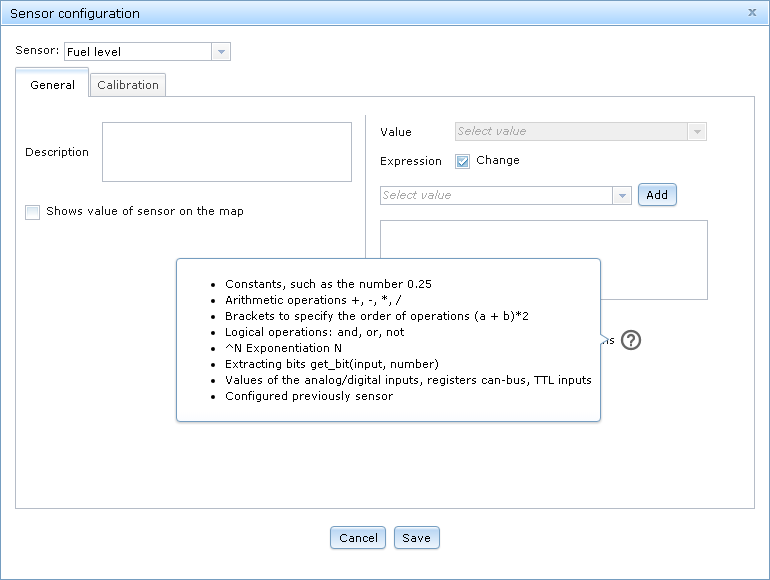
This can be used to configure additional sensors. Below are two examples.
Example 1
There is a truck with two fuel tanks. Sensors are installed on each of the tanks and connected to analog inputs #0 and #1 of the tracker respectively. Then, the sensors will have to be configured as shown on the pictures:
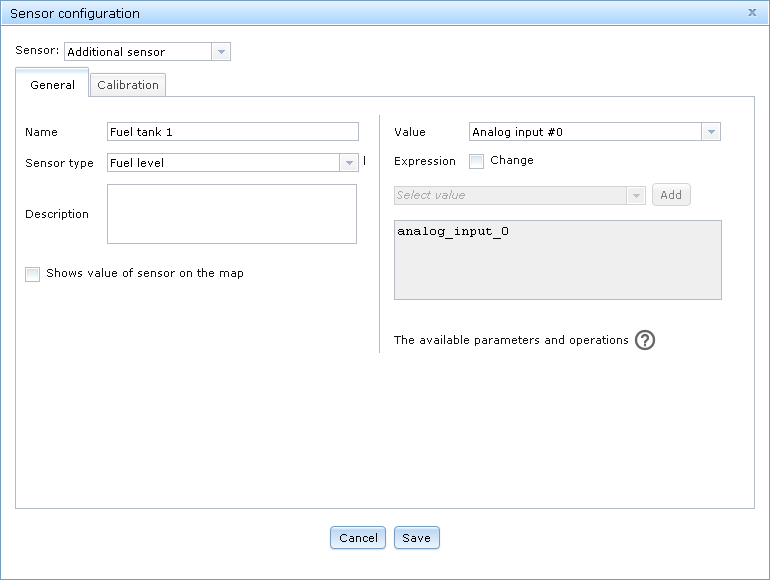
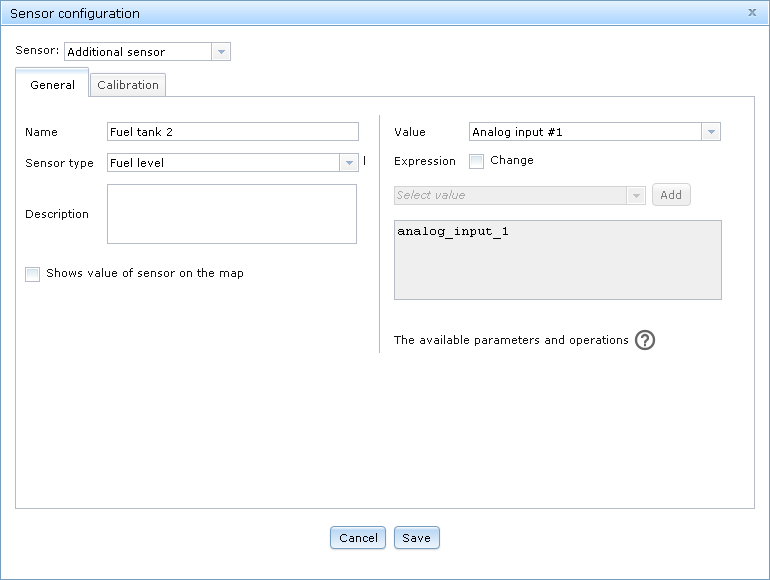
(in this case, sensor type is used to indicate measurement units).
Additional sensors cannot be used in reports. In order for the fuel level to be shown correctly in the reports, the standard fuel level sensor will have to be set up this way:
The resulting expression will be:
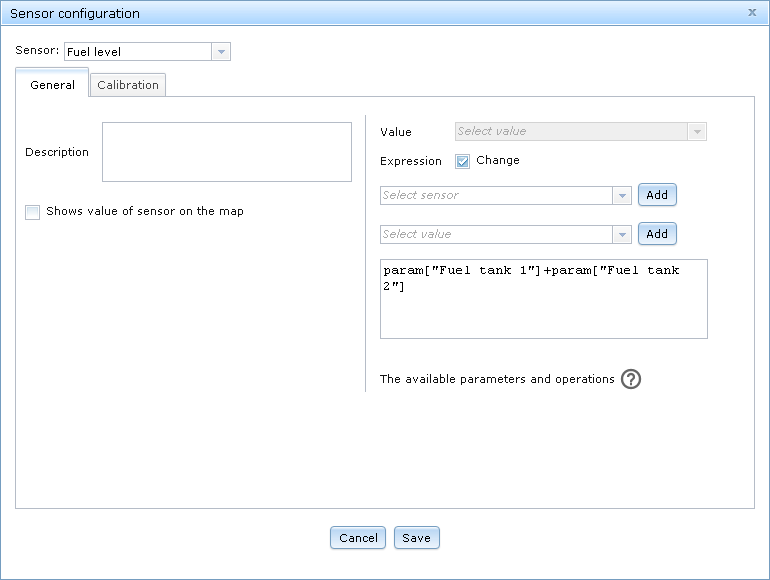
The "Fuel level" sensor will be using the sum of the values of "Fuel tank 1" and "Fuel tank 2" instead of its usual value.
The list of sensors will look like this:
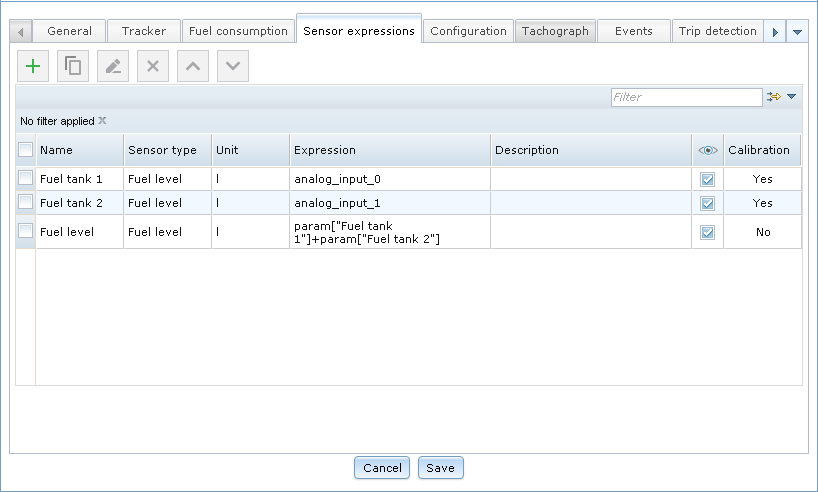
The order in which the sensors are set up is important!
Example 2
It is necessary to know how much distance can be covered using the fuel left in the fuel tank. Knowing, for example, that 15 liters is enough for 100 kilometers, an additional sensor can be configured like so:
This is how it will look in the list of sensors:

Note that units are indicated in the name of the sensor – arbitrary sensors don't have units of their own.
16.3. Glossary
Glossary
Monitored object/vehicle is a vehicle with an installed GPS-tracker, which is being monitored by the Navitel Monitoring program.
GPS-tracker is a data transmitter and receiver device using the Global Positioning System for accurate determination of an object location, used for satellite monitoring of vehicles, people, and other objects, which it can be applied to.
Track is a route recorded by a vehicle tracker and can be displayed on the map.
POI (Points of Interest) – by POI is identified any infrastructural assets and facilities, objects of interest, natural objects, and other points of interest that are displayed on the map.

Chúng tôi muốn bạn biết rằng NAVITEL® đã cập nhật Chính Sách Bảo Mật để bảo vệ thông tin của bạn tốt hơn. Bạn vui lòng tham khảo thêm và giữ liên lạc.